Drive Home Assistant straight from MIDI.
The usual ways to get a MIDI cue into Home Assistant mean wiring up Node-RED, scripts, or another always-on server. MIDI-HA Bridge is the direct, turnkey link — no middleman to build or maintain.
A macOS menu-bar app that maps the MIDI you already send to Home Assistant scenes, scripts, and devices — no Node-RED, no MQTT, no scripting.
New to Home Assistant? It’s the free, local hub that runs your smart home — lights, scenes, and devices.
macOS · Apple Silicon & Intel · free for a single installation




 Logic Pro

Tested as MIDI sources — MIDI-HA Bridge maps their MIDI output to Home Assistant actions. Not affiliated with these products.
One MIDI cue, from the slide to the whole room — in about the time it takes to advance a slide.
Demo: Proclaim sends a MIDI note to MIDI-HA Bridge. The app receives it and triggers a Home Assistant scene.
Most ways to drive Home Assistant from MIDI mean building middleware yourself. MIDI-HA Bridge is the direct link — so any MIDI cue you already send can run lights, scenes, scripts, and the rest of your smart building.
The usual ways to get a MIDI cue into Home Assistant mean wiring up Node-RED, scripts, or another always-on server. MIDI-HA Bridge is the direct, turnkey link — no middleman to build or maintain.
When a setup doesn't run all week — a church, an event space, a venue between shows — MIDI-HA Bridge watches Home Assistant on its own and emails you the moment it stops responding, with no separate server or uptime service to maintain. That outside watch matters because Home Assistant can't report its own outage. Just as useful for any Home Assistant you don't check every day.
Proclaim, ProPresenter, Ableton, Logic, QLC+ — anything that emits MIDI. No new hardware and no change to how the operator already works.
Your slides run the room: advance a slide and lights, scenes, and scripts change with it — no separate lighting person or control surface. Whoever runs Proclaim runs the stage too.
Lighting software stops at DMX. Home Assistant runs the whole environment — smart switches, scenes, scripts, projectors, climate, locks, notifications — so one MIDI cue can drive any of it.
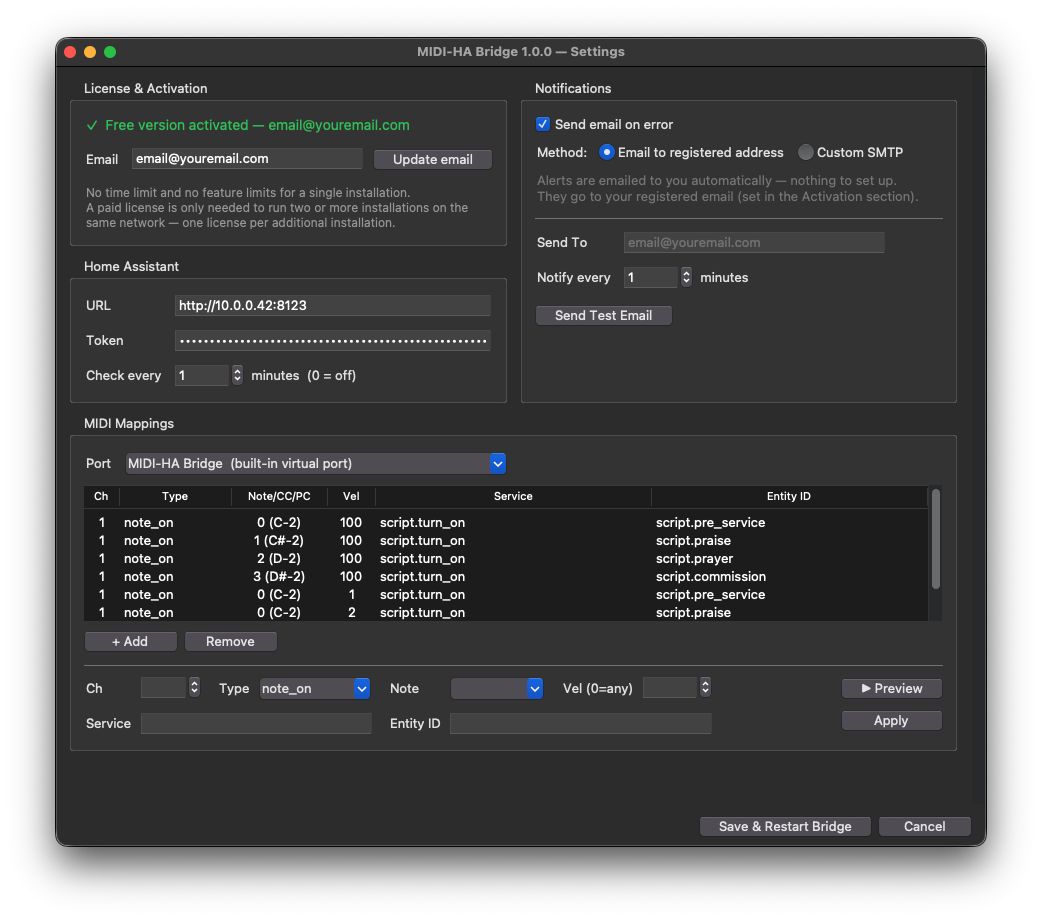
Everything is configured inside the app — no files to edit by hand. No code. No YAML.
Open the .dmg, drag to Applications, and launch. It appears in the menu bar with no Dock icon.
Enter your HA address, such as http://homeassistant.local:8123, and a Long-Lived Access Token.
Leave it on MIDI-HA Bridge — the app’s own built-in port, so there’s no macOS MIDI setup to do.
Match each MIDI note to a Home Assistant action: a scene, a script, or anything else you use.
Full setup guide — app, Proclaim & Home Assistant settings →
Free for a single install — this covers an individual, a typical church, and a venue.
License only when you run two or more computers on the same network.
One installation per local network.
No trial timer. No credit card. No license. No crippleware.
Per additional install — billed monthly.
A Mac, Home Assistant, and a MIDI path from Proclaim or another MIDI source.
Works on Apple Silicon and Intel Macs.
Home Assistant must be reachable on the network, with a Long-Lived Access Token.
Set Proclaim to send MIDI to MIDI-HA Bridge, or connect another MIDI source.
No. The Home Assistant connection, the MIDI port, and every note-to-action mapping are set inside the app. There are no config files to edit by hand.
Yes. It listens to any MIDI source — ProPresenter, EasyWorship, Ableton, Logic, QLC+, or a hardware controller. Proclaim is simply the most common setup it was built for.
The MIDI cue flow keeps running — a failed action just doesn't fire, so the service is never blocked. The app also emails you when Home Assistant stops responding, so you can fix it before the next time you need it.
No. MIDI-HA Bridge runs locally on your Mac and talks only to your Home Assistant over your own network. Email registration is optional, for update and support notices.
With your Home Assistant address and a Long-Lived Access Token, over your local network. There are no add-ons or custom integrations to install inside Home Assistant.
Yes. A MIDI note can run anything Home Assistant does — scenes, scripts, smart switches, projectors, climate, locks, and notifications.
Apple Silicon and Intel Macs. It runs quietly from the menu bar with no Dock icon.
Free covers one installation per local network, with every feature unlocked. Each additional install on that network needs its own Business license — $29/mo or $290/yr per install (2 months free on annual). The first install is always free. A few examples:
Yes. If you'd rather not touch tokens and MIDI ports, we offer remote setup and scene design — see Services. The app and the setup guide stay free either way.
Grab the latest macOS build from the download page — open the .dmg, drag the app to Applications, and launch it. Then follow the setup guide to connect Home Assistant.
MIDI-HA Bridge maps the MIDI you already send to Home Assistant scenes, scripts, and devices.
⬇ Download for macOS